
Connected hardware is only half the product. The other half is the app that pairs with it. It is where most first-time IoT founders get their timeline and budget wrong. We’ve scoped and built companion apps for over 40 connected-device products. They are from smart home sensors to wearables. The same handful of decisions determine whether a project ships in 4 months or drags into 10. If you’re planning iot mobile app development, here’s what to nail down before you request a single quote.
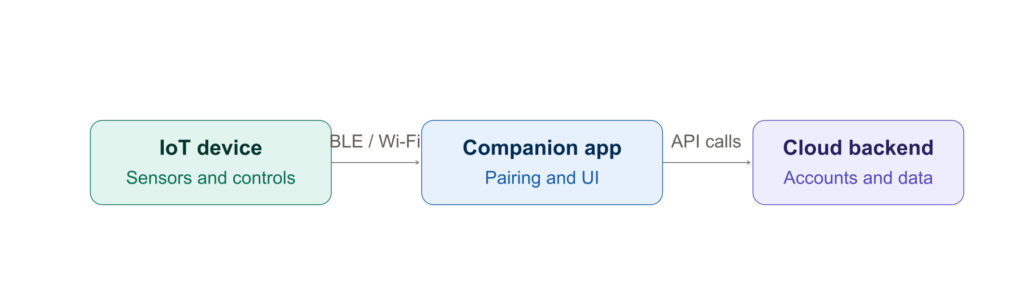
A typical IoT companion app has three layers — the device itself, the phone app, and (often) a cloud backend. Each layer adds its own cost and timeline. This is why the decisions below matter more here than in a typical app project.
Step 1: Decide What iot mobile apps Actually Needs to Control
Before anything else, separate what your device does on its own from what it needs the app to do. This sounds obvious. However, it’s the single biggest cost driver in IoT projects — because every function you hand to the app adds Bluetooth or Wi-Fi communication logic, UI, and testing across device models.
What to actually do:
List every feature your device supports. After that, mark each one as “controlled by the device” or “controlled by the app.” Common IoT features — firmware updates, real-time sensor data, remote scheduling — should only be in the app if a user genuinely needs to act on them remotely.
Why it matters to cost/timeline:
Real-time data syncing and remote control features typically add 3-6 weeks over a simple “view status” app. they require persistent connection handling and much more edge-case testing (what happens when the connection drops mid-command?).
Common costly mistake:
Adding “nice to have” remote controls late in development. Because IoT apps talk to physical hardware, a feature added after the connection architecture is built often means rebuilding that architecture, not just adding a button.
Step 2: Choose Your Connectivity Protocol Based on Real Usage, Not Preference
Bluetooth Low Energy (BLE), Wi-Fi, and cellular each carry very different cost and complexity trade-offs — and the right choice depends entirely on how and where your device is used, not which one sounds most “modern.”
What to actually do: Answer two questions. How far can the device realistically be from a user’s phone during normal use? And does the device need to send data when no phone is nearby?
Why it matters to cost/timeline:
BLE is cheapest and fastest to build for short-range, phone-present use cases (most wearables, smart locks). Wi-Fi or cellular connectivity adds cloud infrastructure. This means backend development, not just app development — which can add 4-8 weeks and ongoing hosting costs.
Common costly mistake: Choosing cellular or Wi-Fi “to be safe” when BLE would fully cover the use case. This is the most common source of unnecessary backend spend we see in first-time IoT projects.
Step 3: Decide Native vs. Cross-Platform Based on Hardware Integration Depth
For most consumer apps, cross-platform frameworks are the cheaper, faster default. IoT apps are the exception where that default can backfire. Bluetooth and hardware-pairing behavior differs meaningfully between iOS and Android at the OS level.
What to actually do:
If your app’s core job is pairing, firmware updates, or anything touching low-level device permissions, ask your iot mobile app development partner directly how much of that layer their cross-platform framework can genuinely share versus rebuild per platform.
Why it matters to cost/timeline:
Cross-platform frameworks can still save real time on UI and business logic — often 25-35% — but if the hardware layer ends up needing platform-specific code anyway, “cross-platform” stops being cheaper and just becomes a second codebase to maintain.
Common costly mistake: Assuming “cross-platform” means one build for both platforms with no exceptions. For hardware-heavy apps, it rarely does.
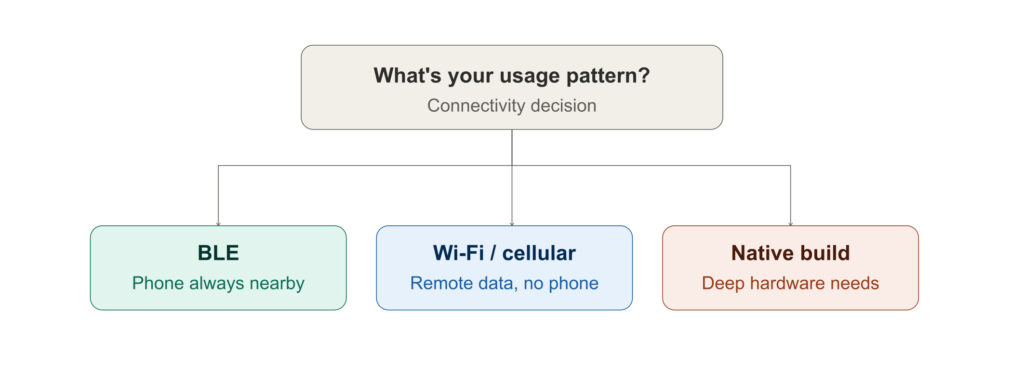
Decision Box: Which Path Fits Your Product?
- If your device only needs occasional phone-present control (locks, sensors, simple wearables) → BLE + cross-platform, phased MVP
- If your device needs to report data with no phone nearby (trackers, industrial sensors) → Wi-Fi/cellular + cloud backend, budget for infrastructure separately
- If your app leans heavily on deep OS-level hardware permissions (health data, background location, custom firmware flows) → Native, at least for the hardware-communication layer
Step 4: Plan for the Backend Before You Plan for iot mobile applications
An IoT app rarely stands alone — data usually needs to go somewhere (a dashboard, a data plan, a customer account). Founders who scope “just the app” often get a second, unplanned quote for backend work a few weeks into the project.
What to actually do: Ask early whether you need user accounts, historical data storage, or multi-device management (one user controlling several devices). Each of these lives on the backend, not in the app itself.
Why it matters to cost/timeline: Backend work for a basic IoT product — accounts, device pairing records, simple data logging — typically adds 3-5 weeks running in parallel with app development. Skipping this planning step is the single most common reason IoT project budgets grow mid-build.
Common costly mistake: Treating backend needs as a “phase 2” decision. Because the app’s data model has to match the backend’s from day one, adding backend requirements after app development starts usually means reworking the data layer, not just adding a server.
Step 5: Budget for Firmware-App Compatibility, Not Just Launch
Unlike most consumer apps, IoT apps have to keep working across every firmware version your device ships, past and future. This is the maintenance cost founders most often forget to plan for.
What to actually do: Ask your iot mobile app development partner how app updates will be tested against older device firmware, and build a firmware-compatibility testing step into every future app update — not just the initial launch.
Why it matters to cost/timeline: Post-launch IoT maintenance typically runs higher than standard app maintenance — often 20-30% of original build cost annually — specifically because of this cross-compatibility testing.
Common costly mistake: Budgeting maintenance the same way you would for a non-connected app, then getting surprised by the added QA time every device firmware update requires.
The Decisions That Actually Determine Your Timeline
Building an IoT companion app well comes down to five decisions: what the app controls versus the device itself, which connectivity protocol matches real usage, whether hardware depth calls for native iot mobile app development, how much backend you need before you start, and how you’ll budget for ongoing firmware compatibility. Get these right early, and a well-scoped IoT app typically ships in 4-6 months. Get them wrong, and scope creep in any one of these areas can easily double that.